Showing posts with label social network. Show all posts

Curriki - social network and resources for educators

Posted in Labels: , ,


Curriki logo

Curriki is a social network and resource site for educators. It is a free platform where educators can share resources and teaching ideas. There are over 250,000 members (free to sign up) and over 40,000 learning resources available. 

You can connect with other educators to collaborate and share feedback on teaching practices, curricula, lesson ideas, and more. 

Resources are searchable by subject, search term, and standards. Resources include links, lesson plans, animations, activities, and much more. 

It's another great free resource for educators. 


Twitter, Google Plus, Facebook - a nice comparison

Posted in Labels: , , ,


There are a variety of social networks out there that we can use as teachers to expand our learning through a PLN, connect with students and parents, and communicate with colleagues. The three major ones are Twitter, Google Plus, and Facebook. They all have different features, functions, and uses.

I use Twitter and Google Plus for real time updates from websites and news and to connect with educators across the globe in my Personal Learning Network to share resources and communicate. I use Facebook to connect with friends and family and keep in touch with former students. You can read more about how and why I use these different services here.

Info.it has a great infographic comparing some of the major features of each of these, from relationships, to sharing, to content.


Which do you use and how / why?


Related:

Google+ - more reasons it's great for educators

Google+ and Google+ Pages - great for educators and schools

Twitter, Facebook, RSS feeds, Email, Google+ - why/when I use each one

Infographic comparing Facebook and Google+ security


Storify - create engaging social stories

Posted in Labels: , ,


Storify is a service that allows you to create a story or collect resources from social media sources. Using the Storify editor you can search social media networks to gather elements, including status updates, photos, or videos, to create a story. You can even add narrative to it. You can then embed and share your story across the web.

This is a great way to gather information from across the web and turn it into a cohesive story. Teachers could use it for lessons and students could use it to create reports and projects on different topics.


Kloosion - soon to launch private sharing & communication service

Posted in Labels: , ,


Kloosion logo

Kloosion is a soon-to-be-launched beta service that promises "a secure and private way to share and communicate". There isn't much more than that available yet, but you can sign up to be notified when the beta is available at their site.

The site is supposedly going to allow you to work, study, and communicate with others with a simple, secure tool.

It sounds like it might be a mini-social network or the like with more security and privacy than most of the current ones.

As soon as it launches, I'll try it out and share more information.


Diipo - Education 2.0 social network for classes

Posted in Labels: , ,


Diipo is a new free service (in beta) that describes itself as "Education 2.0 Social Network for your Class". Diipo allows the teacher to communicate with their students and vice versa and also allows the teacher to connect to other educators and connect classes to each other. It is easy to use and the user-interface (UI) is similar to Facebook and Twitter.

Some of the features include:

  • collaborative workspaces for students to work with each other and get help from the teacher
  • direct messaging 
  • student blogs and micro-blogging
  • upload and share files
  • student project notebooks
  • class roster
  • an educator community
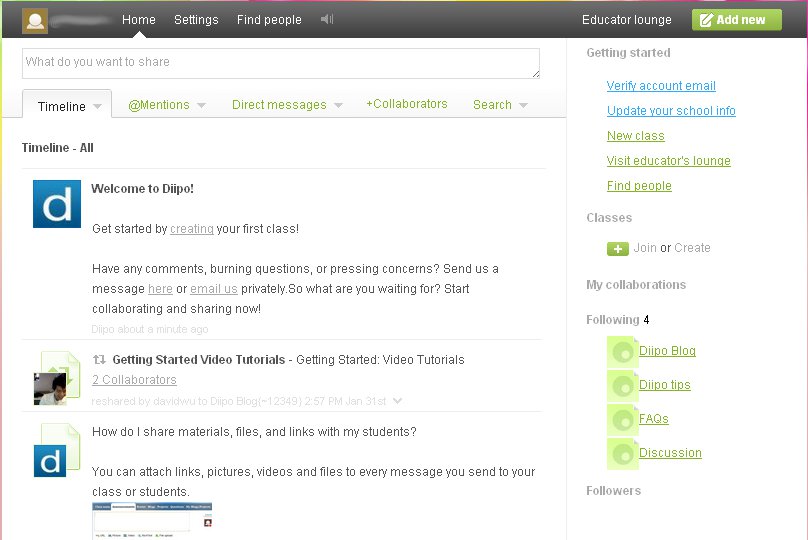
It only takes a minute to sign up and it is easy to use. There are "@mentions", direct messages, full search, getting started tips and videos, and an Educator lounge. 

Here's a shot of the main screen when you create a new account:


This is a great way for teachers and schools to create their own social network system for students that is access controlled.. It allows communication and collaboration and is easy to use. 


Differences between Twitter, Facebook, email, and RSS feeds

Posted in Labels: , , , ,

There are a variety of tools that I use to stay informed and connected online. They each have their own benefits and shortcomings and I have different reasons for using each one.

Twitter

Twitter - Twitter is an excellent resource for educators. I connect with other educators from around the world and share resources and discuss educational topics. I also get breaking news, updates from companies I like, and more. I don't use it as a purely social entity though. It is more for my professional use. The one problem with Twitter is that you can easily miss things as your feed moves along. You can search for users and topics, but it is very easy to miss things. It's strength is instant communication and connecting with people around the world. (however, the 140 character limit can make it challenging sometimes).


Facebook - I use Facebook to connect with friends and keep up with social events. I do follow a couple of business and education pages, but my main use is for keeping with with my friends. There are plenty of educational uses for it, but I haven't gone to far with that yet.


Email -  email is a great method of communicating with people. You can write any length, attach files, and the responses don't disappear in a feed of messages like on Twitter. I have an email account for business use (like banks, etc), my school email account, and a gmail account for Google accounts and communicating. I do not believe that email is dead, or even dying, like many people have suggested.


RSS Feeds - I've read different articles about how RSS feeds are dying too. I don't believe that. I use RSS feeds to subscribe to web sites to get notified when there is a new article. The feed doesn't disappear into a long line of messages like on Twitter. It will be there until I read it or delete it. I can also favorite an article to read later, or even share them with others. It is an extremely useful tool.


Each of these tools is useful in different ways and has different reasons I use them. I don't think that any one could replace the other because they are so different.

How do you use each one?