Showing posts with label free resources. Show all posts

Microsoft Flight Simulator now Free! Great STEM Resources

Posted in Labels: , , , ,


Microsoft Flight Simulator is now available for free. The free version includes tutorials, online and offline play, aircraft, missions on Hawaii. You can pay to get more aircraft, missions, scenery, and other content.

The tutorials are great and it is easy to get started.


I took pilot lessons in college (almost got license too and then instructor graduated. Will try again soon!) and Flight Simulator was a great way to practice and train.

This is a great resource to have students explore the science of flight and aircraft while having fun.

Aerodynamics, Forces and Newton's Laws, Lift, Drag/Friction, Thrust, Controls.


Official TED App for Android now Available

Posted in Labels: , ,


TED

TED Talks are a collection of conversations and speeches by a variety of people, on a variety of topics. These topics range from education to humor to politics to science and much more. They are very informative and educational.

The new TED App for Android allows you to stream audio and video as well as search for different TED talks and even browse by popular talks.

It is a free app and works on Android tablets and phones.

Many TED Talks are about Education so this is a great resource for educators. Other TED Talks are also useful for educators and students.


Source: Android Central


Related:

Android Smartphone and Apps I use as an educator

Android - Apps, Resources, and more for education

Android for Education Apps and Resources.

Android news, resources, app reviews and more
http://educationaltechnologyguy.blogspot.com/2011/11/android-resources-information-news.html

Why I use Google’s apps as an Educator
http://educationaltechnologyguy.blogspot.com/2012/01/why-i-use-googles-products-as-educator.html

Android 4 Schools - app reviews, tips and more for using Android in education
http://educationaltechnologyguy.blogspot.com/2011/12/android-4-schools-great-new-site-with.html

Some more great Android Apps for Education


Essential Apps and Installs for Windows, Chrome, Android

Posted in Labels: , , ,


I have a few essential apps and installs that I put on all of my computing devices, including utilities and software. It is also what I install on other people's computers when they ask me to set them up for them. All of these are free.

PC/Laptop/Netbook:
(These are the basics. With these, I can pretty much do 99% of what I need to. Much of what I do is cloud based, but sometimes you need desktop software and apps.)

AVG Antivirus -  protect your computer from viruses and spyware
CCleaner - clean out old and temporary files. Optimize registry.
DeFraggler - defrag and optimize  your hard drive
LibreOffice - free office suite - word processor, spreadsheet, database, presentation, drawing
VLC Media Player - free media player. Plays pretty much every type of video and audio file.
Paint.net - free graphic editing software
Chrome Browser - access all of my cloud services (Google, Discovery Education, Evernote, Tweetdeck, etc)
Chrome Browser extensions: Clip to Evernote, Google Shortcuts - links to all Google services, Goo.gl url shortener, webpage screenshot, Aviary, cloudy calculator, publish web articles to Kindle, Docs viewer, Extended Share for Google+, TweetDeck


Chromebook:
(For me, they sync from my Chrome account)
Access all of my cloud services.
Add Extensions: (same as above)


Mobile Device (Android in my case):
In addition to included apps: (see below for links to lots of Android for education apps)
Evernote, Google Tasks, Google Shortcuts - links to all Google services, Sugarsync, Dropbox, QuickOffice, Amazon Kindle, Pandora, QR Droid, Shopper, Advanced Task Killer, Antivirus/Security, Skitch, Epocrates, Netflix, IMDB, AStro File Manager, PayPal, Angry Birds


Related:
Why do schools still pay so much for software? Free alternatives to paid software and services.

Open Education Week is this week - connect, create, share Education Resources

Posted in Labels: ,


This week is the first ever, Open Education Week (March 5 - 2012). The purpose is to "raise awareness of the open education movement and its impact on teaching and learning worldwide. Participation in all events and use of all resources is free an open to anyone."

Educators, for the most part, share resources with each other. You can see this on blogs, Twitter and Google+ every day. We know that we are all in this together and we need to help other educators help our students.

This site and movement want that sharing to expand to all educators.


Open education is about sharing, reducing barriers and increasing access in education. It includes free and open access to platforms, tools and resources in education (such as learning materials, course materials, videos of lectures, assessment tools, research, study groups, textbooks, etc.). Open education seeks to create a world in which the desire to learn is fully met by the opportunity to do so, where everyone, everywhere is able to access affordable, educationally and culturally appropriate opportunities to gain whatever knowledge or training they desire.

The Twitter hashtag for Open Education Week is #openeducationwk
 
The site has some great resources: 
ABOUT OPEN EDUCATION page for introductory documents and videos. 
Once you have a feel for what open education is, there are many ways you can participate in Open Education Week: 
CONNECT……..Visit the DISCUSSION page often to see the continuing global conversation happening via blogs, Twitter and postings. Check out the EVENTS AND WEBINARS schedule and join in – participation is open to everyone. 
COLLECT………Find out about the diversity of open education efforts around the world. Visit thePROJECTS area and learn about open education resources and open learning opportunities available to you now. Find out what people are saying HERE. Check out the RESOURCES tab for links to even more information. 
CREATE……….The “open” in open education means that you can modify them, mix them together in new ways, add your own perspectives and share them back to the world. Find out how through some of the video PRESENTATIONS. Put your thoughts down in a tweet or blog, create a video, or post a research paper. 
SHARE…………Tell people about your discoveries via Twitter using the hashtag #openeducationwk. You will be able to see the live Twitter feed on the HOMEPAGE. Share your blog with us (find out how HERE). Let people know that there’s a world of free and open educational opportunities available to them now. Share your thoughts with us in the FEEDBACK area. 
CONNECT……….COLLECT……….CREATE……….SHARE……….

Google is also supporting the Open Educational Resources movement:
http://googleresearch.blogspot.com/2012/03/keeping-oer-mind-about-shared-resources.html


Join it. Connect, Collect, Create, and Share educational resources with other educators.


Free Academic Program (incl CAD software) from PTC

Posted in Labels: , , ,


PTC, makers of Pro-Engineer professional CAD software, MathCad, and more, has an Academic Program for Schools. This program provides Free 3D Design and Engineering software, Free Online Training, Cutting edge industry Design CompetitionsOnline Communities for collaboration and learning, and Support from their engineers and educators.

This free program is a great way to engage students in STEM skills and teach them technology skills (CAD) through the competitions and project based learning. They will also learn valuable skills for the future through these kinds of programs.

Contact them for more information: http://www.ptc.com/appserver/wcms/forms/index.jsp?&im_dbkey=121302&icg_dbkey=482


Check out FREE CAD videos, design competitions, and so much more on the PTC Academic Program Facebook Page.

I've used Pro-Engineer as an engineer. It is an excellent program and PTC provides excellent support.


About PTC
PTC is the leading technology provider in product development software. We provide Product Lifecycle Management solutions to over 27,000 companies in the Industrial, High Tech, Automotive, Aerospace and Defense, Consumer, and Medical Device industries. 
Passionate about Education
For more than ten years, our team of engineers and educators have been working with schools to enhance the teaching and learning of science, technology, engineering and math (STEM) education. PTC believes that the sustained success of our company, our customers, and society depends on empowering each generation to solve real world economic, social, and environmental challenges.

(Thanks to Dolores Gende, @dgende, for the tip)


Related:

STEM Resources for Educators

LibreCAD - free, 2D CAD Software for Windows, OSX, and Linux
My Top 10 Free Google Resources for Education - includes Google Sketchup 3D modeling software.

NASA 3D Resources - fun and educational - includes downloadable models to use in CAD.

10 Important Skills Students need for the Future

Technology in use in Engineering

Some More Ideas for getting students engaged in STEM subjects

Science and Engineering Visualization Challenge - great STEM opportunity

How to Turn a Teen Into an Engineer

TryEngineering - engineering simulations and info on engineering


ClassConnect - find, build, and share lessons

Posted in Labels: ,


ClassConnect is a new, free service that lets teachers build lessons with websites, videos, Google docs, files and more, then organize and store their lessons, and then share the lessons with students, parents, and colleagues.

It's easy to use and a great way to organize, create, and share lessons.

The really cool thing about it is that it was created by a young man, who got the idea while in high school, and instead of going to college, went out to Silicon Valley and created his own startup to create ClassConnect.

Give it a try.


ClassPager - send students quizzes and reminders

Posted in Labels: , , ,

ClassPager Logo

ClassPager is a free service that lest teachers use SMS messages to send students quizzes and reminders and receive answers and feedback from the students. It works like a clicker system, but even better.

It is easy to set up and use and there is a special code that is used so no one actually has anyone's phone numbers.

It can be used to check student understanding during a lesson, as an electronic quiz, or to even communicate with students about upcoming assignments and more.

It is free, and can even be used by non-smartphones. Standard text messaging rates apply for the students, so if that is expensive, it can be used through free texting apps (see site for more details).

Engage all your students on their own devices.

The Science of Baseball - great resource for teaching science

Posted in Labels: , ,


It's almost Baseball Season. Spring training is in full force. This is a great opportunity to make science more relevant to your students by applying science concepts to baseball. Physics, physical science, chemistry, and biology can all be related to baseball.


Exploratorium: Science of Baseball

The Science of Baseball is a great site from Exploratorium that has articles, animations and activities that help students learn about the science of baseball, including pitches, neurobiology of the hitter, materials and construction of bats and balls and more.


Dropmark - free collaborative sharing and presentation tool

Posted in Labels: , ,


Dropmark is a free (fee based accounts available for more storage) collaborative sharing web app that allows you to also create presentations from files and from web content. File sharing is done through a simple drag-and-drop interface. It also allows you to create presentations and slideshows as well as collaborate on them with others.


You upload your files and then you can share them. You can also use the photos in a slideshow or presentation and add video and web sites. You can also add music from YouTube, Vimeo, and SoundCloud.

Free accounts are 250 MB. 25GB costs $48 per year.


Source: Lifehacker

Related:

Popplet - online presentation, mindmapping, and bulletin board


Present me - easy way to record and share presentations


LibreCAD - free, 2D CAD Software for Windows, OSX, and Linux

Posted in Labels: , , , ,


LibreCAD is a free, open source, CAD application that is available for Windows, Apple, and Linux.

LibreCAD is a 2D Computer Aided Design application that has all the features you would expect in a 2D CAD system. It is available in over 20 different languages and for Windows, Mac, and multiple Linux distributions.

It is easy to use, with an intuitive menu and user interface.

This is a great resource for students and teachers to use. Some of my students used it to design their bridges for our bridge project.


Related/Similar:


My Top 10 Free Google Resources for Education - includes Google Sketchup 3D modeling software.

NASA 3D Resources - fun and educational - includes downloadable models to use in CAD.


Snapanda - take picture of word, get definition

Posted in Labels: , ,


I just learned about Snapanda from David Kapuler's blog, Technology Tidbits: Thoughts of a Cyber Hero, which is a great resource!

Snapanda is a new app for Android (iPhone version coming soon) that lets you get the definition of any written English word through your smartphone camera. The app uses OCR technology to read the word and then gives you the definition.

This is a great app for students, especially English Language Learners, to support them in learning English. Not knowing the definition of a word can lead to misunderstandings and frustration.

SnaPanda


Related:

Android Smartphone and Apps I use as an educator

Android - Apps, Resources, and more for education

Android for Education Apps and Resources.

Android news, resources, app reviews and more
http://educationaltechnologyguy.blogspot.com/2011/11/android-resources-information-news.html

Why I use Google’s apps as an Educator
http://educationaltechnologyguy.blogspot.com/2012/01/why-i-use-googles-products-as-educator.html

Android 4 Schools - app reviews, tips and more for using Android in education
http://educationaltechnologyguy.blogspot.com/2011/12/android-4-schools-great-new-site-with.html

Some more great Android Apps for Education


Two Free Graphic creation and editing software

Posted in Labels: , ,


There are two free programs that I think are great for editing and creating graphics.


The first is paint.net. This software was originally created as a school project and is now continually being modified and improved. It is a great tool for editing photos and graphics. I found it to be very polished and powerful. There are tutorials, a user forum, and a great help section available also. I use this for editing graphics for school projects and for this blog. 


Tuxpaint is a great drawing program, especially for the lower grades. It is easy to use and has a lot of built in functions.

I use paint.net to edit photos and graphics that I then use in my classroom. I've used Tux Paint to create some simple graphics for my lessons.


PBS Teachers Activity Packs - free lesson resources for educators

Posted in Labels: , ,


PBS Teachers has some great activity packs for teachers to use with their classes.

They have packs in arts, health and fitness, reading and language arts, science and technology, and social studies.

The activity packs have PBS resources, such as videos of PBS shows like NOVA, web links, and lesson plans for each topic. There are activities for different grade levels also.

These packs are great ways to have a multimedia, project based lesson for your class.


Free Aerospace Simulation App - made by educator

Posted in Labels: , , , , , ,


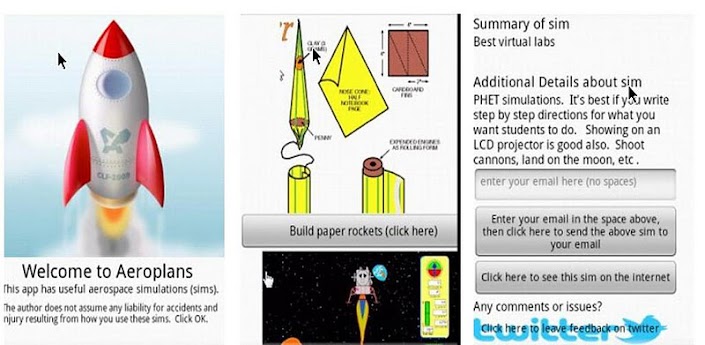
Stephen Hall, and educator and aerospace enthusiast, participated in NASA's Aerospace Professional Development program and then created Aeroplans, a free Android app. The app includes aerospace simulations and instructions for different activities, along with links and information about aerospace topics.

I've been using it for a day or so and it's a fun app and educational.

Aeroplans

Get Aeroplans from the Android Market.


Related:

NASA Simulation based Aerospace Resources for Educators

More great educational resources from NASA

STEM Resources for Educators and Students

NASA Simulation based Aerospace Resources for Educators

Posted in Labels: , , , , ,


NASA's Simulation Based Aerospace Engineering Teacher Professional Development Program is a program geared towards helping educators become skilled in teaching engineering concepts. The program includes education materials, teacher internships, and industry and higher education partnerships. The program offers US STEM teachers the opportunity to work beside NASA engineers and mentors. It is focused on aeronautics modeling and simulation and teachers explore cutting-edge technology, aerospace engineering concepts, and develop hands-on lessons.

The site has lessons from previous sessions that teachers can download and use. The lessons include the simulation and lesson plan. The resource section has downloads, information on simulations, more lesson examples, and other STEM resources and links.


Related:

More great educational resources from NASA

STEM Resources for Educators and Students

NASA Aspire to Inspire - women encouraging girls to enter STEM careers

Posted in Labels: , , ,


NASA, a source of great resources for educators, has another great site. Aspire 2 Inspire is a part of the Women at NASA site and includes resources to help encourage girls to get interested in STEM careers. There are videos and stories about women in different science, engineering and technology careers and career information for students. Videos include real women NASA scientists and engineers. Students can also interact with these women via Twitter.

This is a great way for girls to find out more about STEM careers from women in those careers.


Related:

More great educational resources from NASA

STEM Resources for Educators and Students


This Dynamic Earth - free plate tectonics lesson from USGS

Posted in Labels: , ,


Earth from space

This Dynamics Earth is a free resource from the USGS (United States Geological Survey) for educators on plate tectonics. It is a PDF booklet that you can download and it contains chapters on Developing the Theory, Plate Tectonics and People and more. There is also a website that goes along with it, This Dynamic Planet: A Teaching Companion that has information and classroom activities on plate tectonics.

USGS - science for a changing world

The USGS also has some great resources on Volcanoes http://volcanoes.usgs.gov/about/edu/

These are excellent resources for teachers teaching plate tectonics and earth science.

map of earth showing plate boundaries

TryEngineering - engineering simulations and info on engineering

Posted in Labels: , , , ,


TryEngineering is a great site about engineering. It has information on engineering careers, what engineers do, engineering colleges and more.

There are resources for students, teachers, counselors and parents about engineering careers, how to prepare, colleges and more. Students can explore what it takes to become an engineer, find a college, ask questions and get answers from engineers and engineering students, get news about engineering and technology and more.

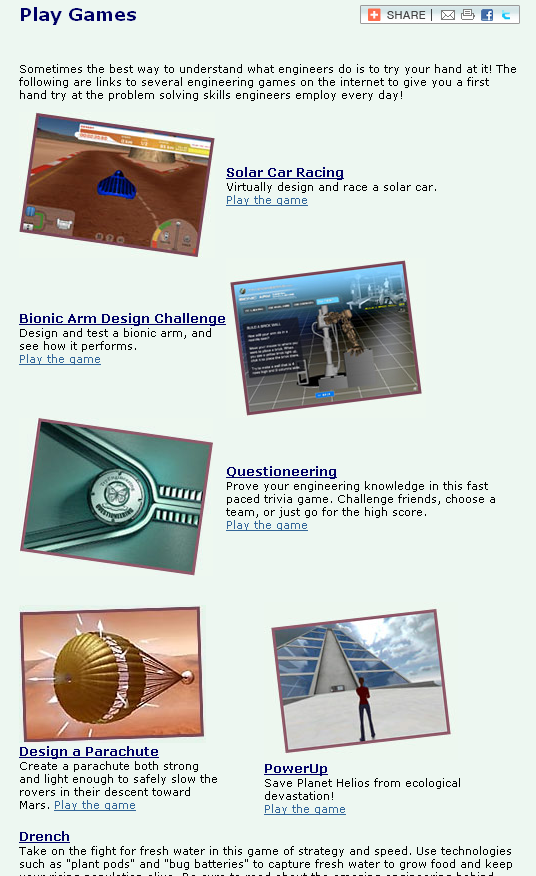
The coolest part of the site though is the "Games" section. In this section, students can select from 27 different resources where they can design, model, and test products and solutions to problems, simulate engineering projects, answer engineering trivia questions and more. Projects include bionic arms, parachutes, solar cars, roller coasters, bridges and more. Some are hosted/created by TryEngineering and others are links to other sites. There are links to more information about each topic also. Some of the games are Flash Based, some Shockwave based, other HTML.

These "games" and simulations are a great way for students to learn about engineering and apply math, science, and problem solving skills to an authentic problem.


Related:

STEM (Science, Technology, Engineering, Math) Resources for students and Teachers.
(collection of resources, links, and more on science, technology, engineering and math lessons, careers and more)

10 Important Skills Students need for the Future


Dabbleboard - virtual whiteboard for online collaboration

Posted in Labels: , , ,

Dabbleboard_logo

Dabbleboard is a virtual whiteboard that allows you to create, collaborate and share. It has an excellent interface that is easy to use. You can use it for presentations, homework and study sessions, chat, and as a whiteboard. 

This could be very useful to teachers and students as a way to collaborate and share. There is a free version and then paid plans if you need more functionality. 

Similar to:

Cosketch - online virtual white board you can share with others

Scribblar - online whiteboard

Twiddla - free online team whiteboarding and collaborating


Here is the interface layout:


Here are some examples of what can be done with Dabbleboard:

Splash1 Splash2


BioInteractive - free resources for science teachers and students

Posted in Labels: , ,


BioInteractive HomeBioInteractive Home

BioInteractive is a site from the Howard Hughes Medical Institute (HHMI) that provides free resources for science teachers and students.

The site has videos, lectures, animations, links, downloads, lesson ideas, virtual labs and much more. You can even order DVD's of many of their programs for free.

The virtual labs include: Transgenic Fly, Cardiology, Bacteria, Neurophysiology, and Immunology.

The materials were developed by educators and scientists and are excellent.

The HHMI is a great resource itself.