Showing posts with label free resources for students. Show all posts

nextSTEP magazine and site - for life after high school

Posted in Labels: , ,


nextSTEP magazine is a great resource for high school students. The magazine itself is not free, although many schools get bulk subscriptions. Their website, http://www.nextstepmagazine.com, does have a lot of free resources for students.

Their tagline is "your life, after high school" and the magazine and web site have advice and information on careers, college planning and more. College search, college planning steps, career descriptions, articles on college life, careers, how to be successful in college, and much more are all on the site.

Our school has a bulk subscription, so the students can pick up a copy in the counselors' offices. Many of the students prefer to just go to the web site. The site has more detailed information than the magazine, along with videos and links to other resources. The site does has all of the articles from the print magazine.

This is a must have resource for high school students.


TryEngineering - engineering simulations and info on engineering

Posted in Labels: , , , ,


TryEngineering is a great site about engineering. It has information on engineering careers, what engineers do, engineering colleges and more.

There are resources for students, teachers, counselors and parents about engineering careers, how to prepare, colleges and more. Students can explore what it takes to become an engineer, find a college, ask questions and get answers from engineers and engineering students, get news about engineering and technology and more.

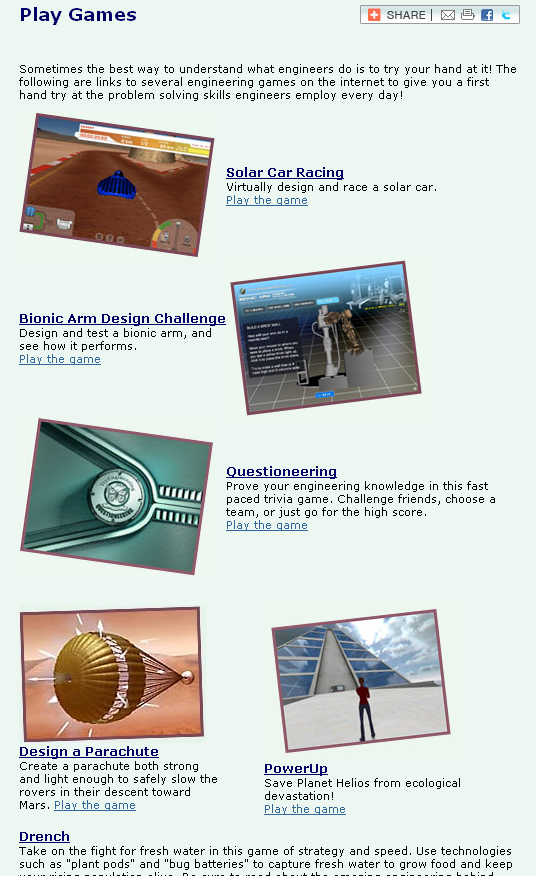
The coolest part of the site though is the "Games" section. In this section, students can select from 27 different resources where they can design, model, and test products and solutions to problems, simulate engineering projects, answer engineering trivia questions and more. Projects include bionic arms, parachutes, solar cars, roller coasters, bridges and more. Some are hosted/created by TryEngineering and others are links to other sites. There are links to more information about each topic also. Some of the games are Flash Based, some Shockwave based, other HTML.

These "games" and simulations are a great way for students to learn about engineering and apply math, science, and problem solving skills to an authentic problem.


Related:

STEM (Science, Technology, Engineering, Math) Resources for students and Teachers.
(collection of resources, links, and more on science, technology, engineering and math lessons, careers and more)

10 Important Skills Students need for the Future


Dabbleboard - virtual whiteboard for online collaboration

Posted in Labels: , , ,

Dabbleboard_logo

Dabbleboard is a virtual whiteboard that allows you to create, collaborate and share. It has an excellent interface that is easy to use. You can use it for presentations, homework and study sessions, chat, and as a whiteboard. 

This could be very useful to teachers and students as a way to collaborate and share. There is a free version and then paid plans if you need more functionality. 

Similar to:

Cosketch - online virtual white board you can share with others

Scribblar - online whiteboard

Twiddla - free online team whiteboarding and collaborating


Here is the interface layout:


Here are some examples of what can be done with Dabbleboard:

Splash1 Splash2


BioInteractive - free resources for science teachers and students

Posted in Labels: , ,


BioInteractive HomeBioInteractive Home

BioInteractive is a site from the Howard Hughes Medical Institute (HHMI) that provides free resources for science teachers and students.

The site has videos, lectures, animations, links, downloads, lesson ideas, virtual labs and much more. You can even order DVD's of many of their programs for free.

The virtual labs include: Transgenic Fly, Cardiology, Bacteria, Neurophysiology, and Immunology.

The materials were developed by educators and scientists and are excellent.

The HHMI is a great resource itself.


Wouldn't It Be Cool If...Great invention contest for 10-15 year olds

Posted in Labels: , ,


Wouldn't It Be Cool If... is a contest for kids, ages 10-15, sponsored by Time Warner Cable's Connect a Million Minds, and i.am FIRST. There are two age categories, 10-12 and 13-15. The challenge is to dream up the "coolest invention idea to make their lives, communities, and even the world more AWESOME."

Students can enter the contest now through March 28th as an individual or teams of 2 or 3 people. The submission is the invention idea and how math and science can make it real.

Winners will be selected by an expert panel of judges and then finalists in each age group will be invited to pitch their ideas, live, to will.i.am, Dean Kamen (master inventor) and other judges at the FIRST Robotics Championship in St. Louis, MO. One grand prize winner may even have their idea developed by innovation firm Fahrenheit 212.

This is a great way to have students apply math and science concepts, creativity, and innovation in a project.

Details on how to enter and official rules are available at the site: http://www.wouldntitbecoolif.com/


Related:

STEM (Science, Technology, Engineering, and Math) Resources for Educators

Project Based Learning Resources for Educators

WPI Plan - a great educational model for all schools

10 Important Skills Students need for the Future


LibreOffice - great free office suite - gets upgrades

Posted in Labels: , , , ,


LibreOffice updates to version 3.5, brings grammar check, bigger Calc workbooks, and more

LibreOffice is a free, open-source, powerful office suite software that is a great alternative to Microsoft Office. I use it on my home computers. It is available for Windows, Mac and Linux and has six applications: Write (word processor), Calc (spreadsheet), Impress (presentation), Draw, Math and Base (database). It works great and the menu functions are similar to Office 97, so the learning curve is easy. It is built off of the same code base as OpenOffice. I happen to like LibreOffice better and think it runs faster.

One of the great features is that it can open, and save as, files in a variety of formats including Microsoft Office (multiple versions), PDF, ODF, and more. I have mine automatically set to load and save as MS Office files so that they work at school without a problem.

Support is excellent, with a great support site and user forums.

The upgrades include built-in grammar checker and a real time work count window for Writer, ability ti embed multimedia in Impress, and increasing Calc's sheet count up to 10,000 per workbook. That's a spreadsheet I do not want to work with. There are quite a few other upgrades too.

Instead of spending hundreds of dollars on office software, download LibreOffice for free. http://www.libreoffice.org/


Related:

Free Alternatives to Microsoft Office

Why do schools still pay so much for software? Free alternatives to paid software and services.

Google for Educators resources (includes Google Docs)


yasp! Easy to use Student Planner for Android

Posted in Labels: , , ,


I just recently posted an article entitled "10 Great, Free Apps for Students for Notetaking and Class Planning" which had some great apps for note taking and class planning, and then I found out about Yasp!

Yasp! is a student planner app for Android that is free and has some great features. It's easy to use and set up your class schedule, as well as enter assignments and due dates. In landscape mode, it displays a week view and can support two week schedules (A and B weeks like my school uses). It supports recurring events, class schedules, assignments with reminders, and one time events like exams.

It does not sync to any desktop version, but is very simple and easy to use and will be a great resource for many students.


Get it in the Android Market for Free: https://market.android.com/details?id=snok.stubefrie


What are your favorite student planner apps? (for any OS)


Related:

10 Great, Free Apps for Students for Notetaking and Class Planning

Android Smartphone and Apps I use as an educator

Android resources - information, news, resources, and more

10 Great, Free Apps for Students for Notetaking and Class Planning

Posted in Labels: , , , ,


These days, there are some great apps for students to use to take notes for class, or to use as class planners.


1. Evernote and EverStudent
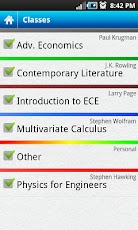
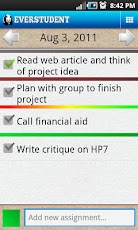
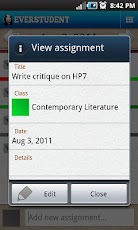
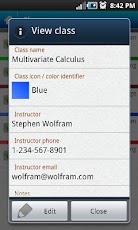
My favorite is Evernote. I use it for everything, literally, and many of my students use it for taking notes, clipping web pages, creating to do lists, and more. There is also a new Android app available, called EverStudent, that integrates with Evernote and acts as a planner for students. EverStudent allows students to manage tasks and assignments with a planner interface by class, color code classes, add instructor info to your notes and group classes by semester or term. All the information is synced to Evernote for access from any device and to share with others. It is available for Android only.


2. Skitch

Skitch also works with Evernote and allows you to create sketches and annotate, edit and save photos and your sketches. Students could use this to take notes or sketches that can't be done with just text. It's available for Android and Mac. iOS version is coming.


3. MySchoolNotebook


MySchoolNotebook is another note taking app I just reviewed earlier here: http://educationaltechnologyguy.blogspot.com/2012/02/myschoolnotebook-free-onlineapps-for.html


4. Memonic


Memonic is similar to other note taking tools in that you can clip web content, take text notes, share notes, and access it from any computer. There are also apps for iOS and Android. You can also email a note to your Memonic account from any computer.

There is also a feature coming that will allow you to use Memonic's web clipper to save notes directly to your Evernote account.


5. SimpleNote

SimpleNote is exactly what it's name says - it's a free, simple note taking app. Notes are just text. However, it does have some great features. You can access it from any computer or web-enabled device. You can easily start and make a note and even share it with others. Your notes are searchable with tags and content search, and there are some extensions and add-ons that you can use with it.


6. SpringPad


Springpad is a notes and organizing service that allows you to create and organize tasks in a different way than Evernote, and organizes your notes differently. You can take notes, clip web sites, create task lists, and more, just like in Evernote, but you can also import data from a bar code, search by location, and add photos. You can organize things by notebooks and tags like in Evernote, but Springpad also has "The Board" which is a digital cork board to help you organize the important things.

Springpad is free, and is available via web app and for iPhone, iPad, and Android.


7. TrackClass


Trackclass is a great, free resource for students. The site allows students to track their classes and assignments, and even will send reminders (email or SMS) for upcoming assignment due dates and test dates. There is also a note taking utility so students can take notes on it if they have a computer in school, or transcribe notes later. You can even attach files to each class and assignment to keep things organized. It is a great way for students to stay organized.


8. Soshiku 


Shoshiku is another free class organizer, similar to Trackclass. It has a calendar, notes, task list, and reminder system like Trackclass. It is not as full featured, in my opinion, as Trackclass, but it is easy to use and some students may like it better than Trackclass.


9a. Paper Planners - Even today, with students having smartphones and laptops and tablets, some still prefer to use paper planners. I use to use Franklin Quest planners until I got my first PDA (A Palm IIIxe in 2000). Some planners can be customized for your school too. We give every student a planner that includes schedules, calendar, homework and assignment lists, and even a hall pass log.

Here are some links to some paper planners. They are obviously not free. Students could also print out blank calendar and planner pages that you can find online and use them as a free paper planner.

Franklin Covey - great paper planning systems, but a little pricey for students.
Day Timer paper planners
DIY Planner - make and print your own planner pages
Planner Pads - paper planners
Day Runner - paper planners
Mead Student Planners
At-A-Glance
Student Planner USA - some nice ones on here (and not expensive)
SchoolMate Student Planners

9b. LiveScribe smart pen


Students could use a LiveScribe smart pen to take paper notes, but have those notes synced to their computer (and even to Evernote). This is a good option for math, science, and engineering, where you really can't take good notes using a keyboard. It also has a voice recorder to record what the teacher is saying. You can buy notebooks, or print out your own paper notes.


10. Google - Calendar, Docs, and Task List 


Google is another great way to get organized and take notes. Google Calendar is a great way to organize class schedules, assignment due dates with reminders and more. You can even color code classes and assignments. If the teacher uses Google Calendar for the class, you can just view that calendar with yours. Google Docs can be used for taking notes and the Tasks can be used as a task list. They can be accessed from any computer or mobile device.


Share these with your students (and use some yourself).


What are your favorite apps for taking notes and getting organized?


mySchoolNotebook - free online/apps for taking notes

Posted in Labels: , ,


mySchoolNotebook is a note taking service the lets students, or anyone else, take notes, edit and format them, and even add images and videos to the notes.

The free plan does have some limits, but still has a lot of features, including notebook sharing, mobile access and offline access. The paid account adds unlimited notebooks, as well as a few other features, for only $2/month.

There are Android and iOS apps for it also, as well as a web app. You can create different notebooks for different classes, etc.

This is a great app for students to get their notes digital.

Related:


Gallery


Gooru - online study tool with great resources

Posted in Labels: , , ,

Connect with Gooru

Gooru is a new (alpha) site I learned about from Richard Byrne on his Free Technology for Teacher's Blog.

Gooru is still in alpha status, meaning it is not fully open to the public yet, but you can still sign up. Gooru is an online study tool that allows students to explore resources and study guides that are aligned to standards. The materials are in math and science and are from 5th grade up to high school. Resources include digital textbooks, videos, animations, and much more. It also includes social media functions so that students can work, study, and share with others.

There are self-assessments in Gooru that help it adapt to the student, suggesting resources and study guides based on the student's performance.

The resources are all vetted by educational professionals and you can even create custom collections and resources.

The site has resources to learn more about it and how it can be beneficial to educators and students.


CiteThisForMe - citation resource for APA and Harvard referencing

Posted in Labels: , ,


CiteThisForMe is a citation generator for APA and Harvard referencing citations. It's very easy to use. Simply select the type of reference (book, journal, newspaper, website, etc.) and then select type of citation format (APA, Harvard, etc.). Organize your citations on the side of the page, and then download them to Word.

Learning about copyright and citations is very important for students. They need to know that they must give credit to the original authors. This cite helps them correctly give that credit through proper citation formats.

Copyright and citation is one of the Tech Skills that Every Student Should Know.

More Citation Help Resources, including citation generator, how to cite, and what to cite.

Taking the Mystery out of Copyright - how, why and when to cite, and what the copyright rules are.


Thinkbinder - free way to create online study groups with lots of features

Posted in Labels: ,

ThinkBinder

Thinkbinder is a free service that lets students create a study group online. They can discuss topics, share links, resources, videos, and more and even chat. There is also a collaborative whiteboard so they can work on problems together and share sketches. It is similar to Dweeber and Scribblar.

This is a also a resource that teachers could use to set up study groups and help groups. 

Share it with your students.


Related: 


Google Plus now open to Teens, with safety features

Posted in Labels: , ,


Google+, Google's social network, is now open for teens. I've been using it for quite a while and really like it. You can post more that on Twitter, have great conversations, have video conferencing, easily choose who to share posts with , and you don't have all the bloat and apps that Facebook has.

Google has changed the age requirements for Google+ so that any Google Account user can join. That means it is now open to anyone 13 years or older.

Google has set some default settings for teens to increase safety and privacy, including setting it so that only people in the teens circles can send notifications and comment on posts. It also sets it so that if a teen has a hangout going and someone outside their circles joins the hangout, the teen will be removed but given a chance to rejoin. This gives them a chance to make sure the new, unknown person is safe to have in the hangout and wanted.


Google also has a Google+ Teen Safety Guide  and Google+ Safety Center for parents and teens that has safety tips and more information about Google+


Related:

Google+ - more reasons it's great for educators

Google+ and Google Pages - great for education

Twitter, Google Plus, Facebook - a nice comparison


Great Science Fair resource created by a student

Posted in Labels: , ,


I just found out about a great resource for students about science fairs. It was created by a student, Kevin Temmer, as part of his community outreach project in high school and is an animated video that teaches students about the science fair. NASA, the National Science Foundation and National Geographic have featured this video.

You can view the animation here: http://www.schooltube.com/video/f0c0a7a0e5cd2646928c/Prepare-for-the-Science-Fair and it is embedded below. It is 15 minutes long.

The NASA profile on his animation can be viewed here: http://www.nasa.gov/audience/foreducators/science-fair-is-a-winner.html 

Kevin's father shared this information with me because Kevin would like more students to view this to help inspire them to participate in science fairs and pursue science careers. It's also a good example of the kinds of projects that students can do outside of the typical assignments.

Share it with your students and colleagues.

Here is the video:


Free booklets with high school and college success tips for students

Posted in Labels: , , ,


Barcharts is a company that prints up those colorful laminated quick study booklets you see at the bookstore and even supermarket. I've purchased a few over the years (Physics, Computer, Accounting) and found them to be very useful. They have quick study booklets on almost any topic from Biology to Physics to History, Economics, Cooking, Computers and much more. Different titles come different sizes, including full size (8 1/2" x 11"), pocket size, poster and more. They average about $6 each.

They also offer some free quick study booklets on some topics that are very useful for educators and students. The ones that I always share with my students are: Keys to High School Success, Keys to College Success, and Surviving the College Ride. They all include very useful tips on studying, time management, how to get help, and much more. They are all available as FREE PDF file downloads.


There are also some fun free ones including Stupid Jokes, Umpire and Referee Signals, and Ramen Noodle Recipes.

Share this with your students.


The 3 apps and services I can't live without

Posted in Labels: , , , , ,


Top 3


This week I've had two colleagues and three or 4 students ask me what technology apps and services I use the most or can't live without. The reason was that they were looking to get started using some new things and wanted to pick a couple that they could learn and use for a majority of their needs instead of learning and using lots of different apps. So, here are my 3 apps/services that I can not live without:


1. Evernote - Evernote, an electronic notebook with lots of great features, is my main tool. I have lesson plans, lesson notes, lesson resources, research, travel info, recipes, lesson schedule, meeting notes, attached files, clippings from web sites, to do lists, personal references, tech resources and instructions and so much more. It is the main app I use for almost everything.


2. Dropbox - Dropbox is a great file sync, backup, and sharing service that you can use for free. The rest of the files I need to use that are not in Evernote are setup in my Dropbox so that they are synced on my home and school computers and my smartphone. I can access my files from any web browser also. I never have to worry about losing a flash drive or forgetting to copy or email myself a file.


3. Google - I know this is kind of vague because Google has so many services, but I use a lot of them. Blogger for this blog and my class blogs, Sites for my class website, Gmail, Google+, Calendar, iGoogle, Docs, search and so much more.


With these three apps/services, I am organized and have all my data and materials available at any time. All three have great apps for my Android SmartPhone also.

When I help get people started using web 2.0 apps like these, I always want to start them with just one or two at a time. These three can do most of what people need. They are easy to use, yet powerful, and there is a lot of resources and support for using them.


What are the three apps or services you can't live without?


Runner-Up:


I use Tweetdeck in Chrome browser to access my PLN on Twitter. So, I guess I really have 4 I can't live without.


Related:

Why I use Google Resources and Tools as an Educator

Android Smartphone and Apps I use as an Educator