Showing posts with label Google for Educators. Show all posts

Google Announces Google Play - music, movies, books and apps

Posted in Labels: , , , ,


Google Play

Google has just announced Google Play. Google Play will combine the Android Market, Google Music and the Google eBookstore. Google is describing Google Play as a "digital entertainment destination" combining apps, games, movies, music and books into one place.

All of your musics, movies, books and apps are stored online, always available on any device through Google Play. Google Play stats:
Store up to 20,000 songs for free and buy millions of new tracks
Download more than 450,000 Android apps and games
Browse the world’s largest selection of eBooks
Rent thousands of your favorite movies, including new releases and HD titles
The move starts today and the Android Market will get upgraded on Android Phones and Tablets over the next few days. Video, books and music apps will be upgraded to Google Play Movies, Google Play Books and Google Play Music apps. The music, movies, books and apps you’ve purchased will continue to be available to you through Google Play.

Google is also going to have some special prices for albums, books, video rentals and apps over the next week. 

Country info:
In the U.S., music, movies, books and Android apps are available in Google Play. In Canada and the U.K., we’ll offer movies, books and Android apps; in Australia, books and apps; and in Japan, movies and apps. Everywhere else, Google Play will be the new home for Android apps. Our long-term goal is to roll out as many different types of content as possible to people around the world, and we’ll keep adding new content to keep it fresh.

For teachers, students and schools using Google and Android, this is important information. It brings all of these different media types into one location.


Google Play: https://play.google.com/store
About Google Play: http://play.google.com/about/


(on a side note, I love the interactive logo circles on the Official Google Blog).


10 Things You Need to Know About Google Plus

Posted in Labels: , ,

Waylou has a great article entitled "10 Things You Need to Know About Google Plus". Google Plus is a great resource for education. There are some great functions and it isn't cluttered with apps and games. You can easily create Circles (groups of people) and selectively share what you want with different groups. Hangouts let you have video conferencing (free) which can be used for study groups and more. I really like Google Plus. This article has some great information about the features and uses of Google Plus.

I highly recommend the article, and Google Plus, for educators.


Related:

Social Media in Education - connect, share, learn, communicate and more

Google Launches ThinkB4U Digital Literacy Portal

Posted in Labels: , , , ,


Yesterday was Safer Internet Day 2012. As part of this, Google posted some great internet safety resources on their Public Policy Blog. There was a new service listed: ThinkB4U. Google is describing it as a "digital literacy portal" that combines interactive videos with expert advice on online safety.

The site opens with a video about the Parkers, a family living in the digital age. Then there are separate videos about different topics. The site has separate menus for students, educators, and parents and addresses online safety in different ways for each audience.

Topics range from digital distraction, online shopping, online scams, research and information literacy, cyber-bullying, digital footprints, texting, sharing online, and effective digital communication. These topics are addressed in each menu, but approached differently for each audience.

I highly recommend ThinkB4U to all teachers to share with their classes, students, colleagues, friends, and parents of students.

http://www.thinkb4u.com/


Related:


Safer Internet Day 2012

Internet Safety Resources - help students stay safe online

Discovery Education Web 20.11 - great internet safety resources.

Google Good to Know - online safety and data info

Google Family Safety Center - help promote safety online.

Why I Use Google's Products as an Educator


Google Chrome now available on Android - the perfect combo

Posted in Labels: , , ,


I love Google Chrome as a web browser. It's fast, secure, works perfectly with Google products that I use, and has great features and extensions. I also love Chrome OS - starts up fast, works great, has all the features of  the Chrome browser. I also love Android - great UI, great apps, works great with all the Google products I use. 

I kept thinking that the perfect device for me would be Android with the Chrome Browser. The browser in Android is very good, but this would be better. It would combine the best of both worlds. Awesome web experience, with apps and ability to work offline. I could actually replace a laptop or desktop with an Android tablet that has the Chrome browser and an external keyboard. It would also add even more functionality and usefulness to my smartphone.

I also think it would be great for education. All the great web browsing and web apps access with the Chrome browser, along with ability to work offline and access tons of great apps.

And now, it seems like Google is heading towards making that a reality.

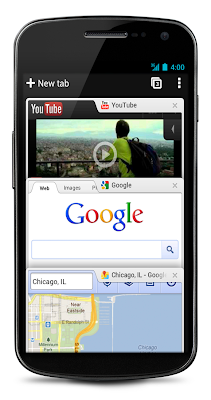
Today, Google announced that the Chrome Browser is available for Android (Version 4.0, Ice Cream Sandwich only though).It is still in Beta, but looks very good.

      Android Central

The Chrome browser on Android is faster and has tabs and syncs with your Chrome browser on your desktop, bringing your bookmarks with you. You can even view open tabs on your desktop browser in your Android Chrome browser and send pages between the two.

The big feature I'm waiting to hear about is extensions. If Google can have Chrome for Android handle extensions like goo.gl, Evernote and such, it may be the perfect mobile system.

You can read more about it and see a video and some great screen shots at the source links below.

Sources: 


The Official Google Blog: http://googleblog.blogspot.com/2012/02/introducing-chrome-for-android.html

Android Central http://www.androidcentral.com/google-chrome-beta-now-available-android-40-devices


Related:

Google Chrome Web Browser

Android Smartphone and Apps I use as Educator

On Device Software vs. Web Apps

Google for Educators Resources

Google Chrome OS - great idea for Education

Why I use Google Products as an Educator


February 2012 Google Educator Newsletter

Posted in Labels: ,


College Tips by Google

I'm a huge user of Google's resources for both myself and my students and classroom. 


Here is why I use Google's resources as an educator:


Here is the Google Educator Newsletter for February.


February 2012 Google Educator Newsletter
Hello educators,
We're excited to kick off 2012 with new competitions for students (Doodle 4 Google, Google Science Fair) events for educators (Google Teacher Academy, NY/NJ Google Apps Summit), and education resources (new Google Education site and YouTube for Schools). 
Also, you can now stay up to date with the Google Education Google+ page for the latest news and upcoming events - http://goo.gl/kTnnE 
Best regards,Dana NguyenGoogle Education Team

-----------------------------------------------------------------------------------------------------Google Teacher Academy in London - 4-5 April 2012-----------------------------------------------------------------------------------------------------We're hosting our 14th Google Teacher Academy next spring at our Google London office on 4 April 2012 with an optional half-day unconference on 5 April 2012 2012. We are accepting applications from all over the world, so polish up your writing and video skills and apply by 11:59 PM PDT on 16th February 2012.  For more information, please visit our site: http://www.google.com/educators/gta.html
----------------------------------------------------------------------------------------------------US Doodle 4 Google 2012 is open for submissions!-----------------------------------------------------------------------------------------------------Doodle 4 Google invites K-12 students to express the theme--”If I could travel in time, I’d visit...”--as creatively as possible using Google’s logo as their canvas. This year’s winner, along with having his or her doodle featured on our homepage for a day, will take home a $30,000 college scholarship and a $50,000 technology grant for their school. And as an added bonus, the winning Doodle will be featured on a special edition of Crayola’s 64 box! We hope you’ll get everyone in on the fun (but please -- just one doodle per child!). All submissions must be postmarked by March 20th and received by March 23rd so there’s not a moment to wait! Check out www.google.com/doodle4google for more details.
-----------------------------------------------------------------------------------------------------NY/NJ Google Apps for Education Summit Mar 22-23-----------------------------------------------------------------------------------------------------The Google Apps for Education East K-12 User group (k12east.appsusersgroup.com) is hosting a 2 day summit on March 22nd and 23rd. This two day event, lead by Google Certified Teacher, Google Apps for Education Certified Trainers, administrators, and members from the Google Apps team will focus on deploying, integrating and using Google Apps for Education to promote student learning and achievement.  This event will take place on March 22-23 at Kean University in NJ. Cost for the event is $200.  Registration and information for the summit: https://sites.google.com/site/nynjgs12
-----------------------------------------------------------------------------------------------------New Google Education Website, Google+, and Booklet-----------------------------------------------------------------------------------------------------We launched 3 new Google resources we launched today for educators and education-enthusiasts:(1) A newly-improved website, google.com/edu, which is a one-stop-shop for Google in Education.(2) A Google in Education Google+ page, which has news, tips, and  discussions http://goo.gl/G42c3. (3) A booklet, "Google in Education: A New and Open World for Learning,” which describes how people are using Google’s education resources - google.com/edu/about.html .
-----------------------------------------------------------------------------------------------------Google Science Fair 2012 now open!-----------------------------------------------------------------------------------------------------The Google Science Fair is in its second year in partnership with CERN, LEGO, National Geographic and Scientific American. The competition is open to students between the ages of 13 - 18 from all over the world. Students will have the opportunity to compete for over $100,000 in scholarship funds, an expedition to the Galapagos, life changing experiences at CERN, Google and LEGO and a new Science in Action Award courtesy of Scientific American. This year we also have some great educator resources to help you bring the Science Fair into your classroom and encourage your students to explore their scientific passion. Visit www.google.com/sciencefair for more information.
-----------------------------------------------------------------------------------------------------YouTube for Schools, now available!-----------------------------------------------------------------------------------------------------YouTube for Schools lets schools access free educational YouTube videos while restricting access to other YouTube content. Students can learn from more than 400,000 videos, from well-known organizations like Stanford, PBS and TED, and from up-and-coming YouTube partners with millions of views, like Khan Academy, Steve Spangler Science and numberphile. Schools can also customize their YouTube for Schools experience, adding videos that are only viewable within their school network. Visit YouTube.com/Schools to learn more and sign up today!
-----------------------------------------------------------------------------------------------------Chromebook Classroom Special Offer-----------------------------------------------------------------------------------------------------Chromebooks for Education give students, teachers, and administrators a simple solution for fast, intuitive, and easy-to-manage computing. Buy 30 or more Chromebooks and receive a Chromebook charging cart and a Google Cloud Print printer.google.com/chromebook/education

-----------------------------------------------------------------------------------------------------Google+ ideas for teaching & learning-----------------------------------------------------------------------------------------------------Although Google+ is not yet available for under 18s, there are still a number of ways you can harness it for learning in and out of school. Here are a few ideas we have seen from teachers:(1) Universities- Tking or teaching university classes? Visit the new Google+ community page for universities: http://www.google.com/+/learnmore/universities/(2) Lesson resources- Looking for a lesson starter? An image to illustrate a difficult concept? Current events? Within Google+ you can now search public posts and web results. For example type [supply demand] into the bar and find news articles bringing the concept to life, images, etc.(3) Guest speakers- Looking for a guest speaker but can’t afford to bring them to your class or Career Day? Consider having them join via a Hangout, projecting them into your class.(4) Holidays- Looking for easy ways to edit and create images for the holidays? Within Google+ Photos you can choose “Edit” and then “Creative Kit” to access fun editing tools. Add a Christmas hat, a birthday present, and other fun edits
-----------------------------------------------------------------------------------------------------Google Code-in-----------------------------------------------------------------------------------------------------Google Code-in is a contest designed to get students interested in open source software. Students complete tasks in one of eight categories: coding, translation, outreach, documentation, quality assurance, user interface, research, and training. Completion of just one task will get the student a t-shirt and a certificate of participation. More tasks earn the students cash prizes and possibly a grand prize trip to Google’s headquarters with a parent or guardian. You can learn more about the contest and register at www.google-melange.com
-----------------------------------------------------------------------------------------------------App Inventor is Moving to MIT-----------------------------------------------------------------------------------------------------App Inventor was started and incubated in the Google Research Group and now that it is well established it is time for App Inventor reach new heights at MIT!  At the end of December 2011 Google will end support of App Inventor and make the code base open source.  MIT has already begun making plans to run an open source instance of App Inventor and looks forward to furthering the momentum of App Inventor among educators through its newly established Center for Mobile Learning.  To learn more about MIT’s work and get updates on the MIT instance of App Inventor visit: http://mitmobilelearning.org/-- Google for Educatorshttp://www.google.com/educators

Google Plus now open to Teens, with safety features

Posted in Labels: , ,


Google+, Google's social network, is now open for teens. I've been using it for quite a while and really like it. You can post more that on Twitter, have great conversations, have video conferencing, easily choose who to share posts with , and you don't have all the bloat and apps that Facebook has.

Google has changed the age requirements for Google+ so that any Google Account user can join. That means it is now open to anyone 13 years or older.

Google has set some default settings for teens to increase safety and privacy, including setting it so that only people in the teens circles can send notifications and comment on posts. It also sets it so that if a teen has a hangout going and someone outside their circles joins the hangout, the teen will be removed but given a chance to rejoin. This gives them a chance to make sure the new, unknown person is safe to have in the hangout and wanted.


Google also has a Google+ Teen Safety Guide  and Google+ Safety Center for parents and teens that has safety tips and more information about Google+


Related:

Google+ - more reasons it's great for educators

Google+ and Google Pages - great for education

Twitter, Google Plus, Facebook - a nice comparison


Google announces new Google in Education resources

Posted in Labels: ,


I am a huge user of Google's Resources for Educators and think that they are excellent for education. Read more on Why I Use Google's Products as an Educator.


Google recently announced the creation of “Google in Education: A New and Open World for Learning” which gathers all of Google's resources and lessons learned into one place for educators. It is a booklet, that will be updated continually as a resource for educators. The booklet has data and examples of how Google's resources have helped in education.

Google also revamped their education website, google.com/edu, so that it has everything in one place and they have a Google+ page that has news, tips, updates and more about Google's educational tools and products.

The site has examples of how Google resources are being used by educators and the benefits of using these resources, lesson plans, and a listing of all of Google's tools. It also has professional development and training resources for integrating Google's tools into your classroom and school. The student section has information on Google's many educational programs and scholarship opportunities, along with tips on using Google's tools.

The resources were developed with feedback and information from educators who actually use them in their schools.
These three resources, the booklet, the site and the Google+ page, are all excellent resources for educators that are using, or are looking to use, Google's many tools in their classrooms. 


Google Takeout - take your Google account data with you

Posted in Labels: , , ,


I'm a huge user of Google products for personal and work uses. I'm also someone who likes to have my own backup of data. There are also people who want to take their data with them if they are leaving Google for other services.

Google Takeout lets you download your data from a variety of Google's services to your computer. You can do all of your data or select the services to download data from. Services include +1's, Buzz, Circles, Contacts, Docs, Knol, Picasa Web Albums, your Profile, your Google+ Stream, and Google Voice.


You select "all", or individually select services, and then click "Create Archive" and it will download a zip file of your data. The time and size will obviously depend on how much data you have.

Security Note: Since Google Takeout involves your personal information, we'll sometimes take extra care to protect you by asking you to verify your password even though you're already signed in. 
You can also export your Docs in Docs, by selecting the documents you want, click "more", then "download", "all items" and the formats you want them downloaded. You can also use GDoc backup which will backup all of your Docs to your computer.

Notice that blogs are not included in the list above. To download a copy of your Blogger blog, go to "settings", "other" "export blog" and export it. You also have the ability to export your contacts, bookmarks, and more from each application's setting menu.


Related:

Google for Educators Resources

Why I Use Google's Products as an Educator

The 3 apps and services I can't live without

Posted in Labels: , , , , ,


Top 3


This week I've had two colleagues and three or 4 students ask me what technology apps and services I use the most or can't live without. The reason was that they were looking to get started using some new things and wanted to pick a couple that they could learn and use for a majority of their needs instead of learning and using lots of different apps. So, here are my 3 apps/services that I can not live without:


1. Evernote - Evernote, an electronic notebook with lots of great features, is my main tool. I have lesson plans, lesson notes, lesson resources, research, travel info, recipes, lesson schedule, meeting notes, attached files, clippings from web sites, to do lists, personal references, tech resources and instructions and so much more. It is the main app I use for almost everything.


2. Dropbox - Dropbox is a great file sync, backup, and sharing service that you can use for free. The rest of the files I need to use that are not in Evernote are setup in my Dropbox so that they are synced on my home and school computers and my smartphone. I can access my files from any web browser also. I never have to worry about losing a flash drive or forgetting to copy or email myself a file.


3. Google - I know this is kind of vague because Google has so many services, but I use a lot of them. Blogger for this blog and my class blogs, Sites for my class website, Gmail, Google+, Calendar, iGoogle, Docs, search and so much more.


With these three apps/services, I am organized and have all my data and materials available at any time. All three have great apps for my Android SmartPhone also.

When I help get people started using web 2.0 apps like these, I always want to start them with just one or two at a time. These three can do most of what people need. They are easy to use, yet powerful, and there is a lot of resources and support for using them.


What are the three apps or services you can't live without?


Runner-Up:


I use Tweetdeck in Chrome browser to access my PLN on Twitter. So, I guess I really have 4 I can't live without.


Related:

Why I use Google Resources and Tools as an Educator

Android Smartphone and Apps I use as an Educator


Google Calendar for Educators

Posted in Labels: , ,

Google Calendar

Google Calendar is one of Google's many free resources that I use. It has some features that make it very useful.

It's accessible on any web browser and integrates and syncs with smartphones, Outlook, Apple iCal and Mozilla Sunbird.

I have all of my appointments, due dates, deadlines, etc. on it. I color code them based on school, blog, degree program, meetings, fun, etc. My wife and I share our Google Calendar's with each other so we can easily see each other's schedules. If you use Google Tasks and set a due date for the task, it will show up on your calendar for that day. I also have US holidays and the Yankees schedule on my calendar.

The reminders feature makes sure you don't miss an appointment or forget to do something. You can set it to just have a pop-up reminder (which also triggers an alert on your Android Phone), send an email, or send a text message and set a time for the reminder.

You can invite people to an event you have set up and then they can RSVP via email or Google Calendar.

It also makes it easy to set up appointments. This is great for administrators or educators who want to make it easier to schedule appointments with staff, parents, or students. The Appointment Slots feature lets you set time slots on your calendar that other people can sigh up for. This is great for office hours and parent conferences.

You can also share your calendar on blogs and websites. Create a calendar for your school or classroom and post it on your site with upcoming events.

Google Calendar is very powerful, easy to use, very useful, and free.


Why I Use Google's Products as an Educator

Posted in Labels: , , , , ,


College Tips by Google


Yesterday, I wrote a post entitled "Alternatives to Google's web services and apps" in which I listed a variety of services and apps that do what Google's tools and apps do for people who may not want to use Google's. I use Google's tools and apps extensively though, and here's why.


Google has a lot of great tools and apps that I use for both personal and school. I use iGoogle as my homepage and as an organizational tool, I use Gmail for email, I use Google Docs for word processing, presentations, and spreadsheets, along with surveys. I use Google Calendar, Blogger for this blog and my class blogs, Google Sites for my class web site, Google Tasks, Picasa and Piknik, Google+ as a great social media tool, Chrome web browser, Google Bookmarks, goo.gl URL shortener, Google Reader, Google Voice to communicate with parents, Google Maps and Google search. I also use other Google tools on occasion. 

I use them because they work great, are easy to use, integrate with each other, work perfectly on the Chrome web browser and on my Android smartphone, only need a single login for them all and login once on Chrome to get into them all, they are free, there is a huge amount of support available and there are great resources for educators for using these tools in education. 

Google's tools have great features like sharing and collaboration with others. I love being able to share a document or presentation with someone else and even work on it at the same time. I love being able to share calendar events and have multiple calendars visible at once. I love being able to easily create a blog or website for my classes. I love being able to connect with others on Google + and not be distracted by games and apps like on Facebook. I like the way Google's tools work, integrate, collaborate and present information. Gmail's conversation view stacks email replies together. Microsoft's Exchange email doesn't quite get this right. 

The Chrome web browser is secure and fast with great extensions and add-on's to make it even more useful. The goo.gl URL shortener and Evernote web clipper make sharing and saving web sites and information easy. Google Reader is easy to set up and read my feeds and Google Maps has some great features like street view, 3D building views, inside maps, and directions for walking and using public transit. Google search has always been easy and relevant. 

My students also love using Google tools. At the beginning of the school year I share lots of resources with them and Google is one of them. Most of them already have Gmail accounts, but are pleasantly surprised by the rest of the tools available. They end up using Docs for class assignments, creating blogs and websites as part of projects, and start using the other tools to get better organized. They always thank me for showing them these resources. The Google Student Blog is also a great resource for them.

The other thing that is nice about these Google tools is the ability to back up and export all of your data from each resource. That means that your data and what you have created are not locked into Google. Each tool has the ability to let you export your data in different formats so you can migrate it to a different service or just back it up. This is great piece-of-mind. 

Android and Google's resources, obviously, work great together. Every single Google app I use has an Android app that works great. This means that I can do everything with my smartphone and don't even need a desktop. This means that I can do my work at any time, any place, which makes me more productive. Google tools also work great on mobile browsers. 

In addition to Google's resources, my other main resources are TweetDeck and Evernote. I use TweetDeck to connect, share, and learn with my Personal Learning Network, and I use Evernote to organize data, take notes, plan lessons, and clip and save information from web sites. With these two web apps and Google's, I can do 99% of what I need to do on a daily basis. I don't need to use other resources. And, since my data is backed up on my computer, if Google decided to shut down any of these apps, I'd still be ok. 

Google provides excellent resources that are free, work great, and have great features. 


Related Articles and in-depth information:


Alternatives to Google's web services and apps

Posted in Labels: , ,


I'm a huge lover and user of Google's numerous apps and tools. I use iGoogle, Gmail, Google Docs, Google Calendar, Blogger, Google Sites, Google search, Google Tasks, Google+, Chrome, Google bookmarks, Google Reader, Google Voice, Google Maps, and much more.

But not everyone likes Google or wants to use their tools and resources. So, what do you do?


There are some great alternatives out there. Zoho is another suite of online services that educators can use. They have email, calendar, documents and more available. Another alternative is Evernote. Evernote is a free notes tool that can also be used for bookmarks, task lists, documents, and much more. I use Evernote extensively, along with lots of Google's tools.

Firefox is a great alternative to Chrome, OpenOffice can replace Docs, Facebook vs. Google+, Wordpress vs. Blogger, Diigo vs. bookmarks, Hotmail vs. Gmail, Bing vs. Google Maps and Search, and so on.

Lifehacker, a great site for all things, has a great article where they list a bunch of alternatives to popular Google tools.


Do you use Google, or do you use other services (or a combination like me)?


Related:

Google for Educators Resources

Evernote for Educators

Lifehacker - tips and information for everything


Equation Editor for Google Chrome

Posted in Labels: , , ,

Application

The Daum Equation Editor is a free add-on web app for Google Chrome that allows you to easily and quickly create and edit a formula. This is a great resource for math and science educators and students because now they can use formulas in web apps and Google Docs much easier. The equations can be saved as text or images and then inserted in documents or web sites. The equation editor has a nice menu to use for selecting symbols and functions and you can modify the size and font of the equation.


Check it out in the Chrome Web Store.


Good to Know - online safety program - is officially live

Posted in Labels: , , ,


I recently wrote about Google's Good to Know  online safety and information campaign. It was officially announced and launched in the US this week.

It has information and tips for internet safety, how your data is collected and used online, how Google uses data, and how to manage your data and what you share with web sites and Google.


This is a great resource for educators to use with their students, colleagues and friends and family. 


Google Science Fair 2012 is here!

Posted in Labels: , ,


The second annual Google Science Fair is open. Google started the science fair last year and it was a huge success. Students enter their projects and can win some really great prizes. The projects from last year were pretty impressive too.

Students simply register online, get parental consent, do their project site online and then submit the project.

The site has great tips and resources for students and educators. There are three age categories 13-14, 15-16 and 17-18 and prizes in each category. The one grand prize includes a trip to the Galapagos, a $50,000 scholarship, and a hands on experience at either Lego, CERN or Google. Other prizes include $25,000 scholarships, Chromebooks and Chromebook kits for their classroom, intern experiences and much more.

This is a great way for students to work through a science project and have it viewed internationally and have the chance to win some great prizes.

There is a great page with Educator resources, lesson plans, and more to get students started on a project.

For more information or to get started, go to the Google Science Fair site. 


Google Digital Literacy Tour - curriculum on online responsibility and safety

Posted in Labels: , , ,


Google, one of my favorite resources as an educator, has another great resource for students and teachers.

The Google Digital Literacy Tour is a curriculum developed by Google and iKeepSafe that educators can use in the classroom to teach online responsibility to students.

It is a fun, interactive curriculum with hands-on activities and scenarios and is broken into 3 parts. Each part as PDF downloads for educators and students, along with lessons and videos. There is a guidebook for the teacher, along with videos and presentations.

The three parts are: Detecting Lies and Staying True, Playing and Staying Safe Online, and Steering Clear of Cyber Tricks.

This is a great resource to use with students as you teach them cyber-skills and computer use. It is also a great resource to share with adults who may not know enough about cyber-safety and use.\


Related:

Google Resources for Educators

10 Important Skills Students Need for the Future


Integrating Google Tools 4 Teachers

Posted in Labels: ,


I'm a huge fan and user of Google's many tools and resources for educators. I recently found another great site that helps teachers learn about these tools and how to use them in the classroom.


Integrating Google Tools 4 Teachers has tips, resources, and ideas for using Google tools such as Docs, Presentations, Sites, Maps and more in the classroom, including a section on using Google tools to help with STEM education. It even has a list of pro's and con's for Google Apps for Education and regular Google tools. The site is run by Colette Cassinelli, a Google Certified Teacher. 


This is a great site to find out more about Google Tools and how to use them in your classroom.